<aside> ‼️ This manual was taken from the Church of the Highlands production team manuals and modified for our use.
</aside>
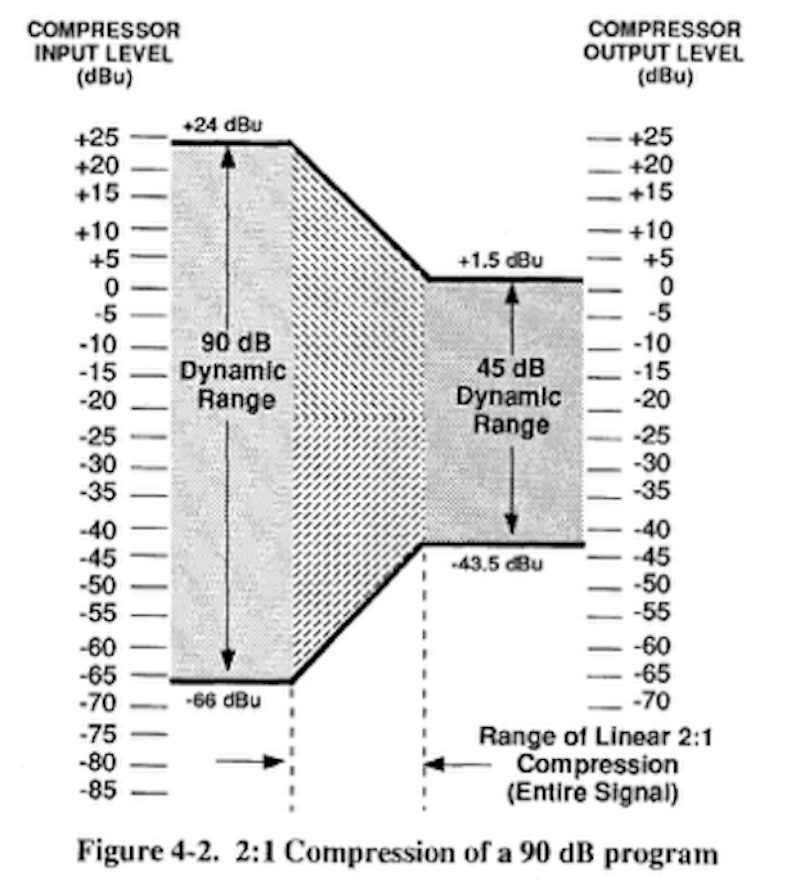
Suppose you’re mixing a female vocalist. Sometimes she sings too softly and gets buried in the mix; other times she hits loud notes and blasts the audience. Or she may move the mic closer or farther away from her mouth while singing, so that her level changes. To control this problem, you can ride the fader by turning her down when she gets too loud and turn her up when she gets too quiet. But it’s hard to anticipate these changes and make accurate adjustments. Instead, you might choose to use a compressor, which in essence does the same thing automatically. It reduces the amplitude, or peak, when the input signal exceeds a predetermined level (called the threshold). Compression is one very popular method of controlling dynamic range. By controlling these amplitude peaks, we are reducing the overall dynamic range of the signal. As a result, the vocalist sits nicely within your mix with much less effort and anticipation on your part. First, let’s talk about dynamic range in general, then we’ll look at controlling it.
Dynamic Range is the difference, in decibels, between the loudest and the quietest portion of a service or performance
Let’s look at one of our services to better explain Dynamic Range:
There are cases where a large dynamic range is not always necessary or desirable. We can reduce or “compress” dynamic with the use of an audio compressor. A compressor effectively reduces dynamic range in a controlled manner. Limiters are a type of compressor. We’ll dig into the characteristics and differences of these next.
In a “live” environment, we are limited in how much we are able to compress a given input. This is especially the case when it comes to vocal microphones. Too much compression can not only cause the source to sound unnatural, it can also result in feedback. On the other hand, in a broadcast or recording environment, we may get away with more drastic compression.
After a recording project is mixed to the desired musical result, there is normally one additional step that takes place, “mastering”. One aspect of this mastering process is the reduction of dynamic range, while giving the sense of being louder. The purpose is to normalize or level out the loudest and softest portions of the overall project. This effectively reduces the project’s dynamic range. This process is accomplished with specialized compressors referred to as “mastering tools”. These specialized tools allow for more aggressive control without causing the project to feel “squashed”.
Through a series of mastering tools, we effectively can limit our dynamic range. This provides a very consistent experience for those joining us for our online campus experience while at the same time translating well for our other campuses. In any sound system or signal chain, there is what is considered a usable range. This usable range is defined as the space between the noise floor and the ceiling where clipping occurs. In some discussions, this may be referred to as the system’s Dynamic Range.
Headroom is the range between your system’s maximum sound level capabilities and your nominal operating level.
Headroom may be thought of as the “safety zone” between our desired operating level including signal peaks and the point at which the signal or system becomes distorted or damaged.
Let’s revisit our Sunday services. Remember we like to keep our peak dB level at around 95. So now, let’s assume that the max level the sound system can safely reproduce is 120dB. We can determine that our Headroom is 25 dB. Why is Headroom important?